Performance Max bidding changes on August 17. What to do before it lands.
Google's 17 August bidding change pulls over-performing Performance Max campaigns back toward target — automatically. Here's what to do before it lands.
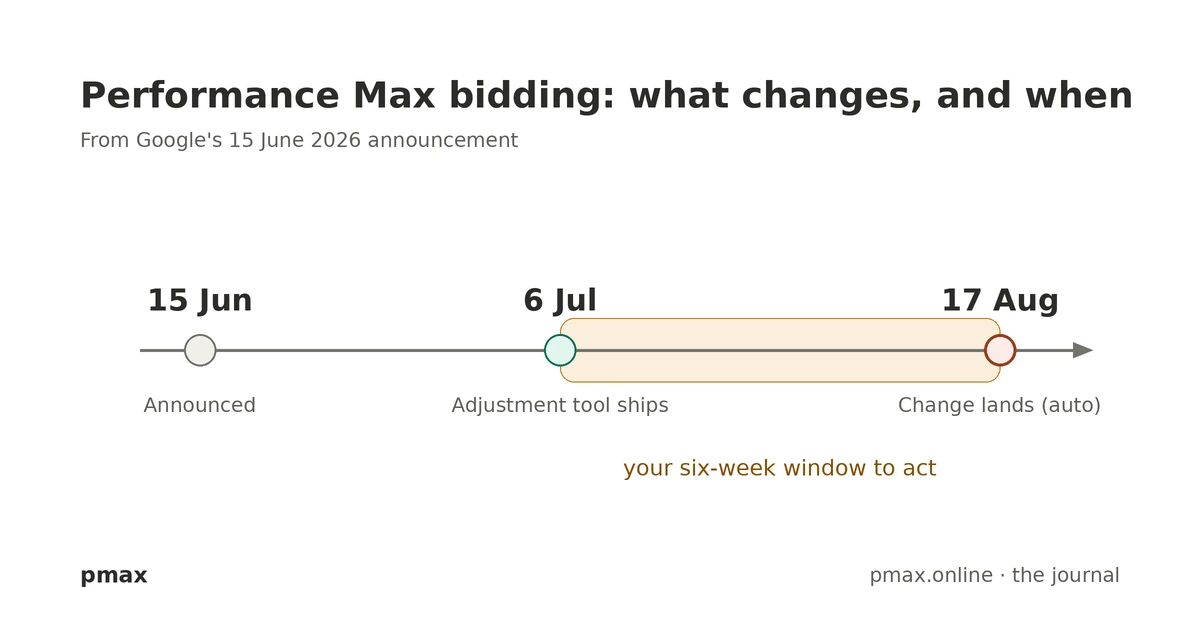
On 15 June Google announced three bidding and budgeting changes in a single post. Two are opt-in betas. The third isn’t optional, lands automatically on 17 August, and for a lot of accounts it means a higher cost per conversion. If you run Performance Max, this is the one to read.
The short version: campaigns that have been beating their Target CPA or Target ROAS are about to be steered back toward the target you actually set. There’s a six-week window to act on your own terms first — and a tool arriving on 6 July to help you do it.
The change: Bidding Target Optimization
Right now, a budget-limited campaign can comfortably over-deliver. Google’s own teaching example is a campaign set to a $10 Target CPA that’s been bringing conversions in at around $5 — half the target. After 17 August, that campaign aims to deliver closer to the $10 it was set to, instead of carrying on at $5.
Same logic on the value side: a campaign set to 300% Target ROAS that’s been running closer to 400% gets pulled back toward 300%.
Three things to be clear about, because this is where accounts get caught out:
- It only touches budget-limited campaigns — the ones held back by their daily or total budget, not by their target. If a campaign is constrained by the target itself, it isn’t the focus.
- It is automatic. It is not opt-out. Google has said it won’t change your targets or budgets for you. Do nothing and the change still lands — your over-performing campaigns drift toward stale targets, and for most accounts that means a higher cost per conversion.
- It covers most campaign types — Performance Max, Search, Shopping, Demand Gen, Travel and Display. App, Video reach and Video view campaigns are out of scope. Hotel and Display already run this way.
This is the boring-fundamentals stuff: the change rewards accounts whose targets reflect reality and punishes accounts running on numbers nobody has revisited in months. See our Performance Max 2026 setup guide for the structural changes that make targeting easier to maintain.
Your six-week window — and the 6 July tool
Between 6 July and 17 August is the only stretch where you, not the algorithm, decide what happens.
On 6 July, Google rolls out a Bid Target Adjustment Tool, surfaced through account notifications for anyone who has had budget-limited, target-based campaigns in the past 12 months. It shows your historical performance and gives three choices per campaign:
- Keep your current target — and accept the pullback toward it on 17 August.
- Match the target to recent performance — formalise the lower cost-per-conversion you’ve actually been hitting.
- Set a custom target of your own.
The real decision underneath all of it is what we call the intention gap: were your conservative targets deliberate, or just out of date?
- If you set a high Target CPA (or a low Target ROAS) on purpose to keep a campaign scaling hard, that lever is about to weaken. Lower the target before 17 August to keep the volume.
- If the targets simply drifted as performance quietly improved, you can accept the change and watch — the account self-corrects toward numbers you’d probably have set anyway.
Neither answer is wrong. Not having an answer per campaign is.
The two betas worth knowing about
Smart Bidding Exploration is now live for Performance Max — globally, for PMax campaigns without a product feed. For Shopping and PMax with a feed, it’s in beta. The feature lets the algorithm bid on queries with no proven conversion history, inside a ROAS-tolerance range, to surface genuinely new demand. Google reports internal lifts in the high teens; treat that as a vendor number until you’ve proved it against a clean baseline in your own account.
Promotion Mode is a new beta for Search and Performance Max only (not Shopping or Display at launch). It schedules a temporary loosening of your ROAS tolerance plus extra daily budget across a defined window — a flash sale, a seasonal spike, a launch. It is not the same thing as seasonality adjustments. Don’t treat them as interchangeable.
One bit of housekeeping: Google also renamed two strategies in June with no change in behaviour. “Maximize conversions with a Target CPA” is now just Target CPA; “Maximize conversion value with a Target ROAS” is now Target ROAS. Cosmetic only — nothing to action.
What we’re doing before 17 August
This is the sequence we’re running on the accounts we manage.
- Before 6 July — set a baseline. Pull 90 days of CPA/ROAS for every budget-limited campaign and flag the ones consistently beating target. Those are the campaigns the August change touches.
- Separate intention from drift. For each flagged campaign, write one line: deliberate scaling lever, or stale target? That single call drives everything else.
- From 6 July — open the Bid Target Adjustment Tool. Cross-check Google’s view against your own. Don’t accept the default — choose keep / match / custom on purpose.
- Lower targets where scale matters. For the deliberate-lever campaigns, reset the target before 17 August so the algorithm keeps pushing volume.
- Pilot Smart Bidding Exploration on one or two PMax campaigns and measure incremental conversions — don’t roll it out account-wide on a reported lift alone.
- Pre-build Promotion Mode windows for known peaks (summer sale, Q4) so you’re not configuring under pressure later.
- Diarise 17 August. Watch CPA/ROAS and spend for the following one to two weeks and correct anything that moved the wrong way.
This isn’t a feature you switch on. It’s a behavioural change that arrives on its own on 17 August, and it quietly favours whoever has kept their targets honest. Walk in with a per-campaign plan and you keep both your efficiency and your scale. Walk in with targets nobody has looked at since spring and you’ll likely watch your cost per conversion drift upward.
Related: Performance Max in 2026 — the settings we change first · how to test AI Max without fooling yourself, which deals with the same mechanism inside Search · Cookieless tracking: what changed and what to do
Need help with this?
If any of the above feels like a problem you have, tell us a bit about your situation and we will come back within a working day. First conversation is 30 minutes, on us.
Philipp is the Founder and Director of pmax, a performance marketing and AI visibility agency in Calvià, Mallorca. He is also the co-founder of crunchjunkie, an AI visibility tracking platform for monitoring brand citation across ChatGPT, Perplexity, Claude and Gemini.
LinkedIn →